
Linux的时间同步
NTP 是 Network Time Protocol 的缩写,也即 网络时间协议,一种在 Linux 上保持准确时间的协议,它和网络上可用的 NTP 服务器保持着时钟同步
在 Linux 中,保持准确的日期和时间至关重要,因为许多服务(如 cron 作业和脚本)依赖于准确的时间才能得到预期的结果
用于同步日期和时间的 ntpd 服务,在新的Linux发行版 ( centos8、Ubuntu 20.04、Fedora 30 ) 中已经废弃了,取而代之的是 chrony
这篇文章主要讲述下centos7和centos8下的时间同步服务器的配置
centos7时间同步——NTP
NTP同步方式在linux下一般两种:使用ntpdate命令直接同步和使用NTPD服务平滑同步。
使用ntpdate命令直接同步的方式存在风险,比如一些定时任务在已有时间内执行过,直接同步导致时间变回任务执行前的时间段,定时任务会重复执行。
使用NTPD服务平滑同步的方式不会让一个时间点在一天内经历两次,而是平滑同步时间,它每次同步时间的偏移量不会太陡,是慢慢来的。
查看是否安装NTP包
rpm -qa |grep ntp如果有输出ntp和ntpdate版本信息,即已安装。
ntpdate :时间同步某台服务器
ntp :作为时间服务器
ntp 可用systemctl管理
# 查看服务状态
service ntpd status
# 启动ntpd服务
systemctl start ntpd.service
# 停止ntpd服务
systemctl stop ntpd.service
# 设置开机自启动
systemctl enable ntpd.service
# 停止开机自启动
systemctl disable ntpd.service
# 查看服务当前状态
systemctl status ntpd.service
# 重新启动服务
systemctl restart ntpd.service
# 查看所有已启动的服务
systemctl list-units --type=service
作为ntp客户端,如何同步服务器端的时间?
以公用的一些时间同步服务器为例
systemctl stop ntpd # 使用ntpdate同步前需要关闭ntpd服务,不然会失败
ntpdate cn.pool.ntp.org
systemctl enable ntpd.service
systemctl start ntpd.service
# cn.pool.ntp.org 中国开源免费NTP服务器
# ntp1.aliyun.com 阿里云NTP服务器
# ntp2.aliyun.com 阿里云NTP服务器
# time1.aliyun.com 阿里云NTP服务器
# time2.aliyun.com 阿里云NTP服务器如何配置服务器作为内网内的时间同步服务器?(NTP服务器的配置)
配置内网NTP-Server(10.0.0.12)
配置NTPD服务的服务器需要能访问外网,这里挑选了一台可以访问外网的Linux服务器配置内网的NTPD服务,作为NTP-Server,其他几台内网通过它来进行时间同步。
这里假设其IP为10.0.0.12,其他几台内网的服务器IP分别为10.0.0.13、10.0.0.14。
在配置NTPD服务之前,先手动同步一下时间
systemctl stop ntpd # 使用ntpdate同步前需要关闭ntpd服务,不然会失败
ntpdate cn.pool.ntp.org
systemctl enable ntpd.service
systemctl start ntpd.service修改NTPD服务的配置文件/etc/ntp.conf
[root@localhost ~]# vim /etc/ntp.conf
#和上层NTP服务器频率误差的记录文件
driftfile /var/lib/ntp/drift
#对于默认的client拒绝所有操作,下面的restrict开通指定权限
restrict default nomodify notrap nopeer noquery
#允许本机地址的一切操作
restrict 127.0.0.1
restrict ::1
#允许192.168.203段机器同步时间,指定可以和NTP通信的IP或者网段
restrict 192.168.203.0 mask 255.255.255.0 nomodify notrap
#远程的同步时间服务器地址(需要同步外网时间必改)
#prefer表示优先同步的主机
server cn.pool.ntp.org prefer
server ntp1.aliyun.com iburst
server ntp2.aliyun.com iburst
server ntp3.aliyun.com iburst
server ntp4.aliyun.com iburst
server ntp5.aliyun.com iburst
#远程时间服务器不可用时,以本地时间作为服务时间
server 127.127.1.0
#stratum指定层数,越小,离时间源,越近。 层级1为国际时间源服务器...
fudge 127.127.1.0 stratum 10
#允许上层服务器主动修改本机时间(需要同步外网时间必改)
restrict cn.pool.ntp.org nomodify notrap noquery
restrict ntp1.aliyun.com iburst nomodify notrap noquery
restrict ntp2.aliyun.com iburst nomodify notrap noquery
restrict ntp3.aliyun.com iburst nomodify notrap noquery
restrict ntp4.aliyun.com iburst nomodify notrap noquery
restrict ntp5.aliyun.com iburst nomodify notrap noquery
includefile /etc/ntp/crypto/pw
#指定日志文件
logfile /var/log/ntp
#指定日志级别,info、all、event三种可以选择
logconfig all
#启用公钥加密
#crypto
#密钥文件
keys /etc/ntp/keys设置ntp client客户端配置文件
vim /etc/ntp.conf
server 10.0.0.12
重启ntp服务
[root@localhost /]# systemctl stop firewalld
[root@localhost /]# setenforce 0
[root@localhost /]# vim /etc/selinux/config
SELINUX=disabled
[root@localhost /]# systemctl restart ntpd
查看ntp服务同步状况
ntpd -qcentos8时间同步——chrony
chrony的优点:
时间同步的速度比 ntpd 更快
chrony 很好的处理了同步延迟以及网络延迟
即使出现网络降级,chrony 仍然能正常工作
本地机器可以作为时间服务器,其他机器从这台服务器上同步时间
在新的 Linux 发行版(centos8、Ubuntu 20.04、Fedora 30)及以后的版本中,系统默认已经安装了 chrony,在这之前的版本是没有安装的,可以使用下面的命令进行安装
yum install chrony安装完成后,chrony 服务默认会自动加到 systemctl 中管理,下面列出了一些常用的命令
#查询 chronyd 服务状态
systemctl status chronyd
#启动 chronyd 服务
systemctl start chronyd
#关闭 chronyd 服务
systemctl stop chronyd
#重启 chronyd 服务
systemctl restart chronyd
#设置 chronyd 服务开机自启
systemctl enable chronyd
systemctl daemon-reload
注意:ntpd 和 timesyncd 都是时间同步工具,但是它们和 chrony 冲突,只能启动其中一个服务
chrony 是由 守护进程 chronyd 以及 命令行工具 chronyc 组成的,具体如下图
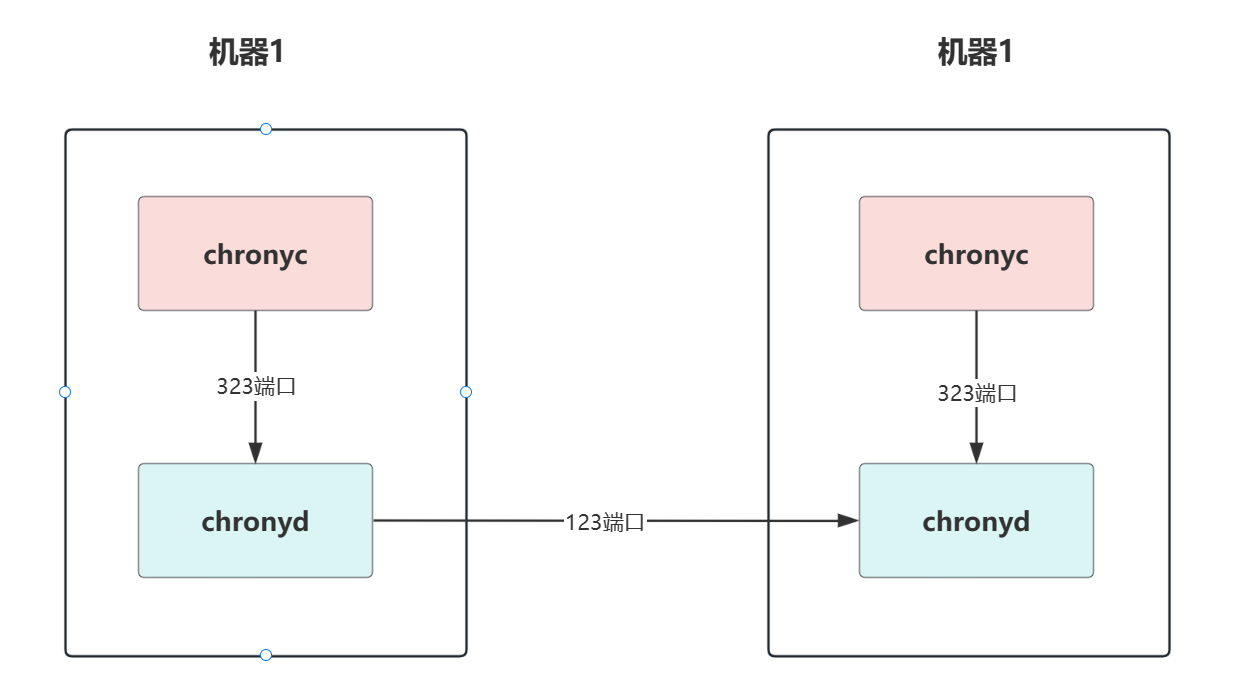
chronyd 在后台静默运行并通过 123 端口与时间服务器定时同步时间,默认的配置文件是 /etc/chrony.conf
chronyc 通过 323 端口与 chrond 交互,可监控 chronyd 的性能并在运行时更改各种操作参数
chronyc 通过下面的方式访问 chronyd
配置chrony时间同步服务器10.0.0.15 客户端10.0.0.13 10.0.0.14
安装客户端服务器
yum install chrony客户端配置
# 同步时间的服务器 IP 或 域名
server 10.0.0.15 iburst

# 系统时钟的预估漂移保存到指定的文件中,是为了在下次启动时能稳定的同步
driftfile /var/lib/chrony/drift

# 如果系统时钟由于某种原因与启动后的服务器时间相差甚远,允许 chronyd
# 通过步进而不是回转来快速纠正它
makestep 1 3

# 为了使客户端实时时钟接近服务器的时钟,以便下次时钟启动时更接近真实的时间
# 增加了一种 rtcsync 模式,该模式下,系统时间会定期的拷贝到实时时钟里
rtcsync

# 日志
logdir /var/log/chrony
服务器配置
安装 chrony 之后,默认的配置是客户端的启动配置的,要想作为一个时间服务器来运行的话, 需要在配置中增加 allow 配置项,它表示允许客户端通过该地址和服务器同步时间
另外,时间服务器的时间也需要从网络上其他的时间服务器进行同步,这里直接用默认的即可,具体的配置如下
# 同步时间的服务器 IP 或 域名
pool 0.centos.pool.ntp.org iburst
pool 1.centos.pool.ntp.org iburst
pool 2.centos.pool.ntp.org iburst
pool 3.centos.pool.ntp.org iburst

# 为了在下次启动时稳定的同步,系统时钟的预估漂移需要保存到指定的文件中
driftfile /var/lib/chrony/drift

# 如果系统时钟由于某种原因与启动后的服务器时间相差甚远,允许 chronyd
# 通过步进而不是回转来快速纠正它,这个过程将花费很长时间
makestep 1 3

# 为了使客户端实时时钟接近服务器的时钟,以便下次时钟启动时更接近真实的时间
# 增加了一种 rtcsync 模式,该模式下,系统时间会定期的拷贝到实时时钟里
rtcsync

# 允许客户端通过该地址和服务器同步时间,其实这里配置的就是时间服务器的地址
allow 10.0.0.0/24
处理防火墙
时间服务器如果有开启防火墙的话,需要开启 UDP 协议 的 123 端口,以允许客户端向服务器发送获取时间的请求
firewall-cmd --permanent --add-port=123/udp
firewall-cmd --reload
重启chrony
systemctl restart chronyd查询信息
在服务器端输入 chronyc clients 命令查看同步的客户端信息
在客户端输入 chronyc sources 命令查查看时间服务器的信息
