

Nginx+Keepalive高可用架构搭建
Keepalived+Nginx 高可用集群(主从模式)
集群架构图:
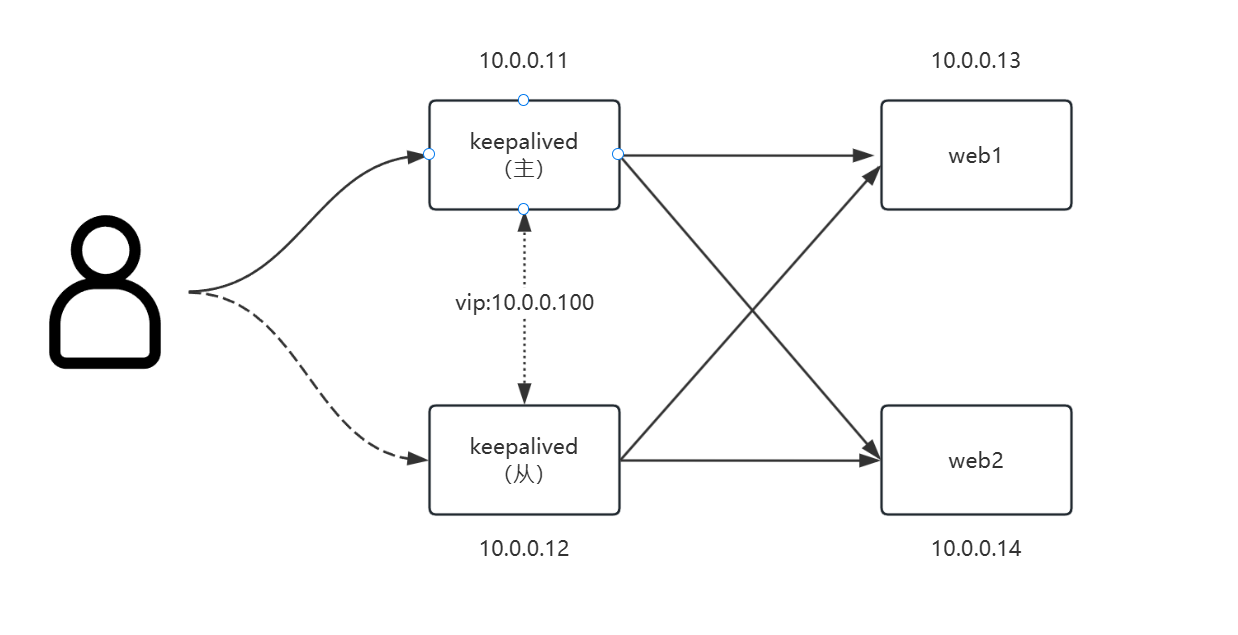
说明:Keepalived机器同样是nginx负载均衡器。
实验环境说明
开始前所有服务器配置:
systemctl stop firewalld         # 关闭防火墙
sed -i 's/^SELINUX=.*/SELINUX=disabled/' /etc/sysconfig/selinux        # 关闭selinux,重启生效
setenforce 0                # 关闭selinux,临时生效
ntpd -p ntp3.aliyun.com    # 时间同步
yum install nginx -y           # 安装nginx;该实验环境为编译安装的nginx,注意目录
两台web服务器配置
1. 准备测试页面
# 准备测试文件,此处是将主机名和ip写到index.html页面中
echo "`hostname` `ifconfig ens33 |sed -n 's#.*inet \(.*\)netmask.*#\1#p'`" > /usr/share/nginx/html/index.html
2. nginx配置
vim /etc/nginx.conf
# 写入以下配置
worker_processes 1;
events {
worker_connections 1024;
}
http {
include mime.types;
default_type application/octet-stream;
sendfile on;
keepalive_timeout 65;
server {
listen 80;
server_name localhost;
location / {
root html; # 相对路径,相对于nginx的根目录/usr/local/nginx
index index.html index.htm;
}
# 出错页面配置
error_page 500 502 503 504 /50x.html;
# /50x.html文件所在位置
location = /50x.html {
root html;
}
}
}
# 重启nginx
systemctl restart nginx
systemctl enable nginx --now两台nginx负载均衡服务器配置
vim /etc/nginx.conf
# 写入以下配置
worker_processes 1;
events {
worker_connections 1024;
}
http {
include mime.types;
default_type application/octet-stream;
sendfile on;
keepalive_timeout 65;
upstream backend {
server 10.0.0.13:80 weight=1 max_fails=3 fail_timeout=20s;
server 10.0.0.14:80 weight=1 max_fails=3 fail_timeout=20s;
}
server {
listen 80;
server_name localhost;
location / {
proxy_pass http://backend;
proxy_set_header Host $host:$proxy_port;
proxy_set_header X-Forwarded-For $remote_addr;
}
# 出错页面配置
error_page 500 502 503 504 /50x.html;
# /50x.html文件所在位置
location = /50x.html {
root html;
}
}
}
# 重启nginx
systemctl restart nginx
systemctl enable nginx --now轮流关闭nginx-master 和 nginx-slave 节点测试,关闭后还是能够访问并看到轮循效果即表示 nginx 集群搭建成功。
搭建keepalived
配置keepalived-master
# 编写nginx运行状态检测脚本
mkdir /tools
vim /tools/nginx_check.sh
result=`pidof nginx`
if [ ! -z "${result}" ];
then
exit 0
else
exit 1
fi
# 安装keepalived
yum -y install keepalived
# 配置/etc/keepalived/keepalived.conf文件
vim /etc/keepalived/keepalived.conf
# 写入以下配置文件
! Configuration File for keepalived
global_defs {
router_id LVS_DEVEL
}
vrrp_script nginx_check {
script "/tools/nginx_check.sh"
interval 1
weight -5
}
vrrp_instance VI_1 {
state MASTER
interface ens36
virtual_router_id 51
priority 150
advert_int 1
authentication {
auth_type PASS
auth_pass 1111
}
virtual_ipaddress {
10.0.0.100/24 dev ens36 label ens36:1
}
track_script {
nginx_check
}
}
# 重启keepalived并配置自启动
systemctl restart keepalived
systemctl enable keepalived
# ip a 查看IP,会发现多出了VIP 192.168.1.110
ip a
......
3: ens36: <BROADCAST,MULTICAST,UP,LOWER_UP> mtu 1500 qdisc pfifo_fast state UP group default qlen 1000
link/ether 00:0c:29:1f:98:0d brd ff:ff:ff:ff:ff:ff
inet 10.0.0.11/24 brd 10.0.0.255 scope global ens36
valid_lft forever preferred_lft forever
inet 10.0.0.100/24 scope global secondary ens36:1
valid_lft forever preferred_lft forever
inet6 fe80::20c:29ff:fe1f:980d/64 scope link
valid_lft forever preferred_lft forever
......配置keepalived-slave
# 编写nginx运行状态检测脚本
mkdir /tools
vim /tools/nginx_check.sh
result=`pidof nginx`
if [ ! -z "${result}" ];
then
exit 0
else
exit 1
fi
# 安装keepalived
yum -y install keepalived
# 配置/etc/keepalived/keepalived.conf文件
vim /etc/keepalived/keepalived.conf
# 写入以下配置文件
! Configuration File for keepalived
global_defs {
router_id LVS_DEVEL
}
vrrp_script nginx_check {
script "/tools/nginx_check.sh"
interval 1
weight -5
}
vrrp_instance VI_1 {
state BACKUP
interface ens36
virtual_router_id 51
priority 149
advert_int 1
authentication {
auth_type PASS
auth_pass 1111
}
virtual_ipaddress {
10.0.0.100/24 dev ens36 label ens36:1
}
}
# 重启keepalived并配置自启动
systemctl restart keepalived
systemctl enable keepalived
# ip a 查看IP,此时备节点不会有VIP(只有当主挂了的时候,VIP才会飘到备节点)高可用测试
访问10.0.0.100测试,同时可访问到web01和web02

关闭nginx-keepalived-master上的nginx,模拟nginx故障,再次访问10.0.0.100测试,可以访问

在nginx-keepalived-slave上查看IP,发现10.0.0.100已经飘到了从节点上

至此,Keepalived+Nginx 高可用架构部署完毕。
Keepalived 配置文件解释
global_defs {
notification_email { # keepalived服务宕机异常出现的时候,发送通知邮件 可以是多个
acassen@firewall.loc # 收件人邮箱1
failover@firewall.loc # 收件人邮箱2
sysadmin@firewall.loc # 收件人邮箱3
}
notification_email_from Alexandre.Cassen@firewall.loc #邮件发件人
smtp_ server 192.168.32.128 #主服务器的ip地址。邮件服务器地址
smtp_connect_timeout 30 # 超时时间
router_id LVS_DEVEL # 机器标识 局域网内唯一即可。 LVS_DEVEL这字段在/etc/hosts文件中看;通过它访问到主机
}
vrrp_script chk_http_ port {
script "/usr/local/src/nginx_check.sh" #检测脚本存放的路径
interval 2 # 检测脚本执行的间隔,即检测脚本每隔2s会自动执行一次
weight 2 #权重,如果这个脚本检测为真,服务器权重+2
}
vrrp_instance VI_1 {
state MASTER # 指定keepalived的角色,MASTER为主,BACKUP为备。备份服务器上需将MASTER 改为BACKUP
interface ens33 # 通信端口 通过ip addr可以看到,根据自己的机器配置
virtual_router_id 51 # vrrp实例id keepalived集群的实例id必须一致,即主、备机的virtual_router_id必须相同
priority 100 #优先级,数值越大,获取处理请求的优先级越高。主、备机取不同的优先级,主机值较大,备份机值较小
advert_int 1 #心跳间隔,默认为1s。keepalived多机器集群 通过心跳检测当前服务器是否还正常工作,如果发送心跳没反应,备份服务器就会立刻接管;
authentication { # 服务器之间通信密码
auth type PASS #设置验证类型和密码,MASTER和BACKUP必须使用相同的密码才能正常通信
auth pass 1111
}
track_script { #添加监控条件
chk_nginx #脚本模块后边定义的名称
}
virtual_ipaddress { # 自定义虚拟IP。自定义的虚拟ip得根据真实ip设置。比如真实ip是192.168.91.138,那么虚拟ip可以设置为192.168.91.139~255,前面三个数得一致
192.168.32.50 # 定义虚拟ip(VIP),可多设,每行一个
}
}